Compare Kitchen, Line, Plant, and Group — their seats, modules, and billing — and pick the one that fits how your operation runs today.
On this page
Was this helpful?
Real help from real food people
Chef Diego runs a real food plant. If this page didn't get you there, tell us — a person reads every message.
Every plan runs the same Bettr Manager. What changes between them is how many of
the modules it switches on, how many people it seats, and what it costs. The
pricing page lays the plans out side by side, so you can match one to
the way your operation runs today — and see exactly what moving up would add
later.
Choose a plan
1
Open the pricing page
Go to the pricing page. Kitchen, Line, and Plant sit side by
side, priced and ready to start, with Group above them for larger
operations. Each card names the plan, its monthly price, the seats it
includes, and the modules it turns on.
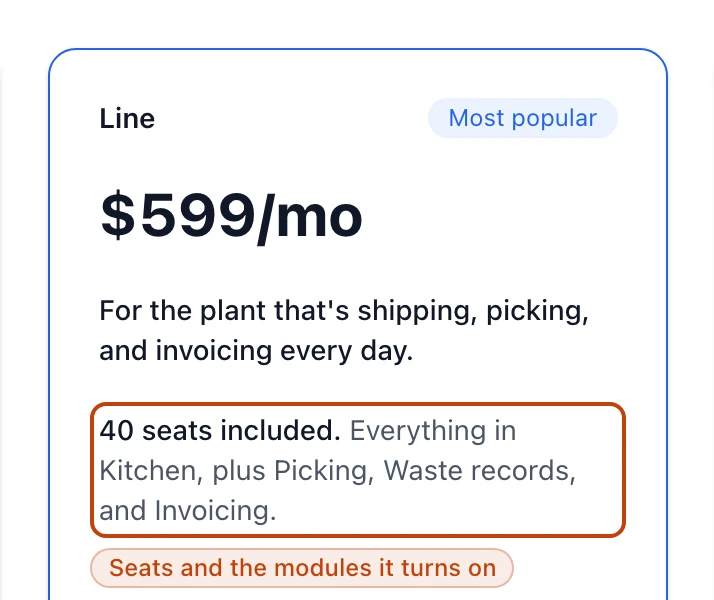
Every plan card follows the same shape: the price, the seats it includes, and the modules it turns on.
2
Match the modules to your work
Start from the work you already do. Kitchen covers buying, making, and
selling. Line adds the shipping and billing side. Plant turns on every
module, down to kitchen returns and the staff schedule. Pick the lowest plan
that covers what your team touches every day.
3
Check the seats
Every plan includes a fixed number of seats — 15 on Kitchen, 40 on Line, 100
on Plant — and there's no per-person charge on top. Count the people who'll
actually sign in and make sure they fit.
4
Decide monthly or annual
You make this choice at checkout, not on the pricing page. Monthly bills
every month; annual bills once and costs ten months instead of twelve, so
two months are free.
5
Start the 14-day trial
Select Start 14-day trial on the plan you chose. That takes you into
checkout to pick monthly or annual and enter payment, and opens a 14-day
trial you can cancel before it ends.
What each plan turns on
The plans stack: each one includes everything below it and adds more.
Kitchen — $299 a month, 15 seats. Turns on Purchasing, Sales, and
Production. It's the plan for getting off spreadsheets: buy, make, sell, and
trace. Full lot traceability,
, and QA holds are built into Kitchen, not sold as a
separate add-on. So is
.
Line — $599 a month, 40 seats. Everything in Kitchen, plus Picking, Waste
records, and Invoicing. This is the plan for a plant that's shipping, picking,
and invoicing every day. It carries a Most popular badge on the page.
Plant — $999 a month, 100 seats. Everything in Line, plus Kitchen returns,
Early kitchen returns, and the Staff schedule. It turns on every module, with
room to grow.
Group — from $2,000 a month. Every module, no seat limit, for operations
running multiple plants or companies. Group isn't self-serve; the Bettr team
sets it up with you, as the last section explains.
Seats, not per-person pricing
Seats come with the plan, and there's no per-seat meter running on top — Kitchen
includes 15, Line 40, Plant 100. You can bring your whole floor without the bill
moving. If you outgrow the seats you have, moving up to the next plan raises the
cap.
Monthly or annual billing
The prices on the cards are monthly. Annual billing is a choice you make at
checkout, once you've picked a plan: it bills a year at a time and costs ten
months instead of twelve, so two months are free. Kitchen at $299 a month, for
example, comes to $2,990 for the year — the price of ten months, not twelve.
When Group is the right call
Kitchen, Line, and Plant each run a single subscription. Group is for an
operation that has outgrown one — multiple plants, or multiple companies under
one roof. It turns on every module with no seat limit, and the Bettr team scopes
and sets it up with you rather than handing you a checkout. On the page, Group
shows a price of from $2,000 a month and a Talk to us button in place of a
trial.
After you pick
Starting a plan opens a 14-day trial. Your card goes on file, and the first
charge lands when the 14 days end; cancel before then and you're not charged.
Whatever plan you start on, you can move up later — the higher plan turns on the
modules above it, and the work already in Bettr Manager carries straight over.