Write off damaged, expired, or spoiled stock — from the warehouse floor or the kitchen line — as a permanent, traceable record of what left, why, and on whose watch.
On this page
Was this helpful?
Real help from real food people
Chef Diego runs a real food plant. If this page didn't get you there, tell us — a person reads every message.
A pallet tips in the cold room and four cases of salmon hit the floor. They're
gone — but your on-hand still counts them, so tomorrow's pick sends someone
hunting for stock that isn't there, and the month-end numbers quietly drift.
stays a mystery only until you write down the part you can name.
Open Waste records
and you log what left, why, and who was on it — and Bettr takes it off your
on-hand for you. Line+
Record warehouse waste
Warehouse waste is received or finished stock you're pulling off the shelf — a
crushed case, a lot that expired, a bag that split. The list opens on All,
with Warehouse and Kitchen tabs carrying a running count on each, and
New starts a record.
1
Open a new waste record
In the top navigation, open Inventory and select Waste records, then
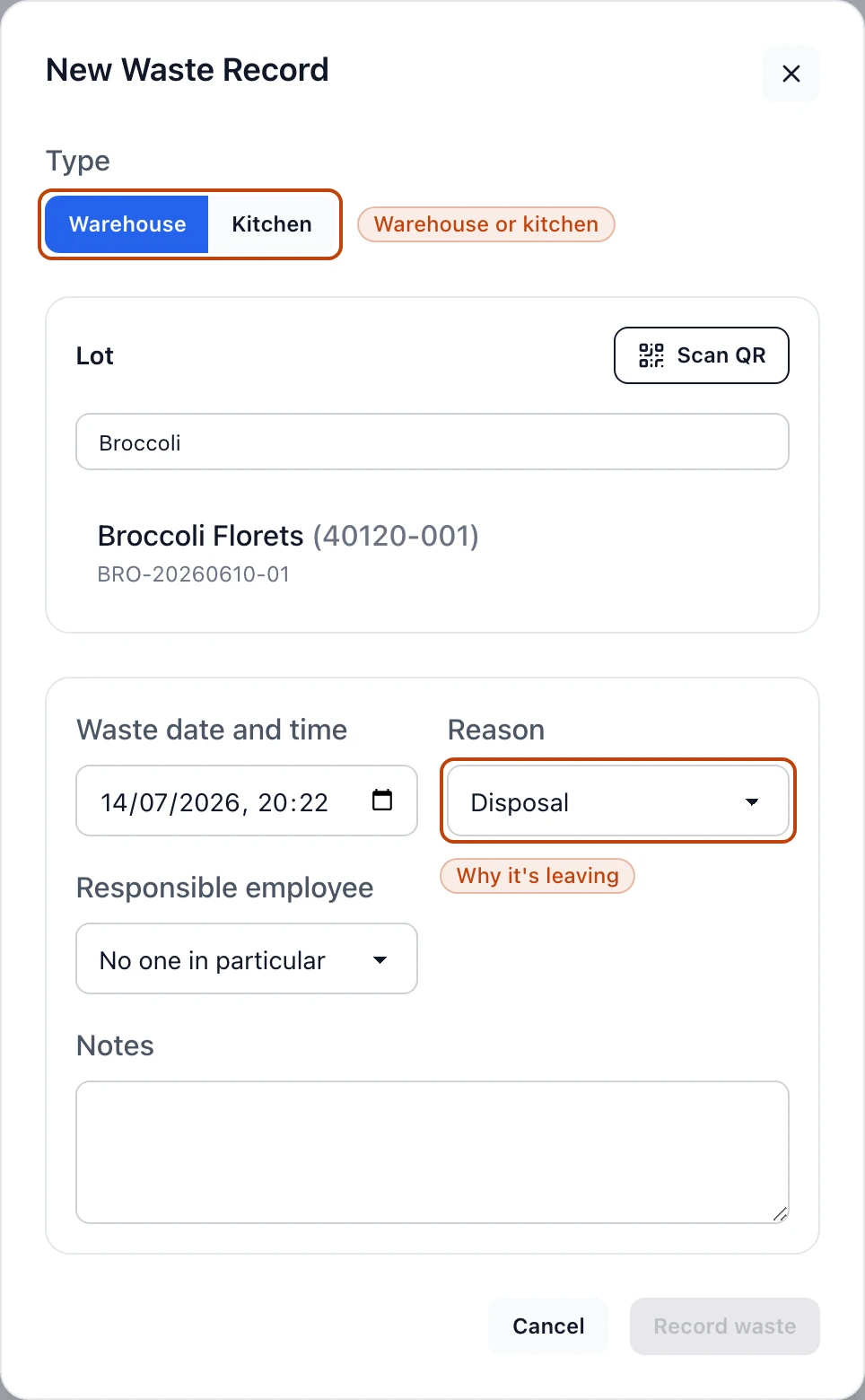
select New. The form opens on the Warehouse type — the toggle at the
top switches between Warehouse and Kitchen.
2
Find the lot you're writing off
Under Lot, search by lot number, product code, or product name, or select
Scan QR to read a label out on the floor. Pick the that's coming out.
3
Choose the location and cases
Pick the Location the stock is leaving — a lot split across two spots
lists each one — then enter Cases to write off. Bettr shows how many cases
that location holds and won't let you write off more than are there.
4
Set the date, reason, and who's responsible
Set Waste date and time, choose a Reason from the menu, and, if it
matters, name a Responsible employee and add Notes. Leave the employee
blank and the record reads No one in particular.
5
Confirm the write-off
Select Record waste. Bettr asks you to confirm — the write-off is
immediate and permanent — then files the record with its own number, like
WR-000001.
A new warehouse waste record: the type toggle picks Warehouse or Kitchen, the lot search finds the batch you're pulling, and the Reason menu records why it's leaving.
A write-off can't be undone
Recording warehouse or kitchen-WIP waste takes the stock off your on-hand the
moment you confirm, and there's no reversing it. If you write off the wrong lot
or too many cases, the fix is a fresh record or a
count that puts the stock back — never
an edit of the one you filed.
Record kitchen waste
Switch the type to Kitchen when what you're scrapping is on the line, not on
the warehouse shelf. The kitchen form has two modes, and the difference decides
whether stock moves:
WIP lot writes off . Search the WIP lot, enter a quantity and unit, and confirming
reduces that lot's on-hand, exactly like a warehouse write-off.
Product logs waste against a finished product for the record but deducts
no stock. Pick the product and department, optionally a specific lot, and
enter the quantity. Bettr files it as an audit entry — for a loss you want on
the books when the stock itself is already accounted for elsewhere.
The Production navigation carries its own Waste records link; it opens
this same list already on the Kitchen tab, so the kitchen team lands where
their records live.
Reasons you can log
Every record carries one reason, and it's the badge you scan for when you read the
list back:
Disposal — thrown out.
To Be Expired — pulled at or near its expiry.
Repack — taken out of one pack to go into another.
Credit Received — written off against a supplier credit.
Donated to Employee — given to staff rather than binned.
The reason is a label on the record, not a switch on your stock — it tells
spoilage apart from a repack later, but the write-off itself works the same either
way.
How waste hits your stock
Open any record and its Record information panel tells you whether stock
actually moved:
A Warehouse write-off books an outbound movement against the lot. Stock
updated reads Yes, with a View movement link into
Stock movements, filtered to this
record's number — the write-off is a line in your audit trail, not a quantity
typed over the old one.
A Kitchen WIP write-off reduces that WIP lot the same way; Stock updated
reads Yes.
A Kitchen Product entry changes nothing on hand; Stock updated reads
Audit only.
Nothing here is a silent edit. Every write-off is a recorded event you can trace
back to the lot, the location, and the person who filed it — which is exactly what
an auditor asks to see.
Edit a record
You can revisit a record to correct its details, but not its quantity. Open the
record, select Edit, and Bettr lets you change the date, reason,
responsible employee, and notes — and warns you plainly that the stock
was already written off when this record was created. The lot and the cases are
fixed. Editing fixes a mistyped reason or a missing name; it never restores stock.
Waste records log the losses you can name
A pallet fall, an expired lot, a scorched batch — those you write off here, with
a reason. The gaps you can't explain, the mystery shrink, surface when you
count a location and get corrected
there. Between the two, your on-hand stays honest.