Record each ingredient you weigh into a batch — from the right WIP lot, at the weight the recipe expects.
On this page
Was this helpful?
Real help from real food people
Chef Diego runs a real food plant. If this page didn't get you there, tell us — a person reads every message.
The teriyaki bowls are on their second batch. The scale is zeroed, the rice and
chicken are already staged in the kitchen, and the recipe wants fifteen pounds of
rice, ten of chicken, and five of simmer base before this batch can move. Weighing
is where you record what actually goes in — each ingredient, pulled from a
specific lot, at a weight the recipe holds you to. That record is what later ties
the finished bowls back to the exact rice and chicken that made them. Open
Production runs, pick
the run, and open the recipe you're weighing.
Kitchen+
Find the recipe you're weighing
Weighing happens on a . From the run's Recipes tab,
select Start on a recipe that's still Pending, or Continue on one that's
In progress, to open it. If you haven't built the run yet, start a
production run first — there's nothing to
weigh without one.
The line item opens on the batch you're working. Under Ingredients · batch 2
you'll find every ingredient the batch needs, one row each:
The ingredient's name, with a Done tag once it's weighed or a Needs 50.000
LB tag while it still owes weight.
Target 50.000 LB · Weighed 0.000 LB — what the recipe asks for this batch,
and what you've recorded so far.
A Weigh button that opens the weigh sheet.
Targets are scaled to the batch. A hundred-unit recipe run as a fifty-unit second
batch asks for half of everything, so the numbers you weigh to are the batch's
share, not the whole recipe's.
Weigh an ingredient
1
Open the weigh sheet
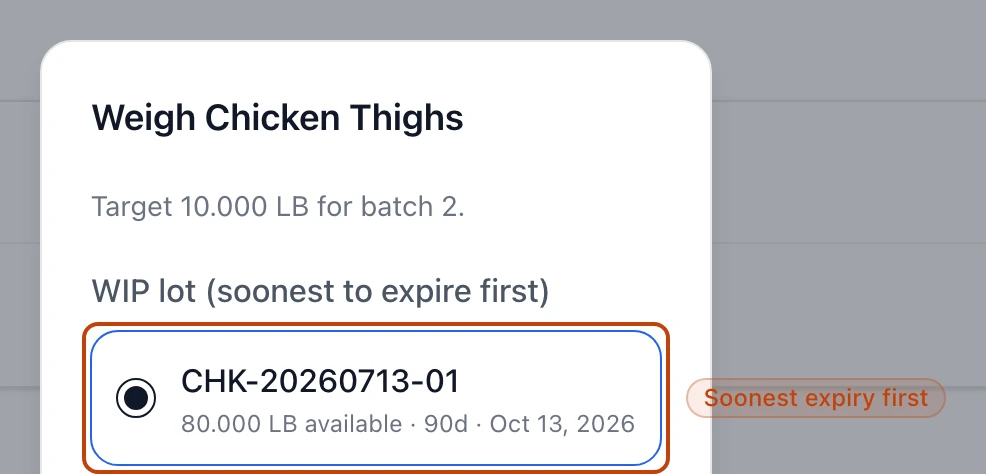
Select Weigh on the ingredient's row. The sheet opens with the ingredient's
name and its target for this batch — Target 50.000 LB for batch 2.
2
Pick the WIP lot
Choose the you're
weighing out of. The list is ordered
, and the soonest lot is
picked for you. Each option shows how much it holds — 50.000 LB available —
then its shelf life in days and the date it expires. If the row reads No WIP lots are
available for this ingredient, none is staged yet; pick ingredients for the
day first.
3
Enter the weight
Quantity starts on the target, so you can take it as-is when the scale agrees
or type what it actually reads. Switch the Unit if you weighed in kilograms
or ounces — Bettr converts it to pounds for you. Use Notes if the weigh
needs a comment.
4
Save the weighing
Select Save weighing. The ingredient's row flips to Done, and the amount
comes off the WIP lot you chose, so its on-hand always reflects what you've used.
The top of the weigh sheet: the batch target, and the WIP lot you weigh from — listed soonest-to-expire first, with each lot's available amount and expiry date.
Scan the lot instead of scrolling
Scan lot, above the ingredient list, opens the camera to read a WIP lot's QR
label. Scan the tote in your hand and Bettr jumps straight to that ingredient with
the matching lot selected — handy when a recipe has a long bill of materials.
Stay within tolerance
Every recipe carries a . Weigh within that band and the ingredient counts as Done. Come
in above the target but still inside the band and the row also flags it Over, so
the overage is easy to spot. Enter a weight outside the band and Bettr refuses it,
naming the exact range you have to land in. You also can't weigh out more than a lot
holds — if the amount tops the lot's on-hand, Bettr says so and points you at another
lot. And Bettr won't record the same ingredient into the same batch twice: weigh it
once, and if the weight was wrong, take the entry back and weigh it again.
Check and undo the weighings you recorded
Every saved weighing shows in the Ingredient entries list under the ingredients,
newest first — the ingredient's name, the weight that went in, and the batch it
belongs to. Each row carries an Undo action.
Undo takes a weighing back. The entry leaves the list, the ingredient's row
returns to Needs 50.000 LB with Weighed 0.000 LB, and the pounds go back onto
the WIP lot they came off, so a mistyped weight or the wrong lot doesn't stick. Weigh
it again and the batch carries on.
Undo only works while the recipe is live
Once you Finish recipe, the floor screen won't take a weighing back — reopen the
recipe first. Undo also needs the Reverse weighings permission: a role without it
reads the entries but gets no Undo action.
Weigh per batch or per run
How you weigh depends on the recipe's setup, shown under the recipe name and on the
batch card:
Weigh per batch runs the recipe one batch at a time. You weigh every ingredient
for the current batch, record its output, then Finish batch to advance to the
next one — and each batch's targets are its own share of the run.
Weigh per run weighs the whole run in a single pass. The batch card reads This
recipe weighs a single run, and you record each ingredient once against the run's
target rather than batch by batch.
When a batch still owes weighings
A recipe can't be finished until its batches are weighed. Until then the batch is
marked Ingredients pending, and back on the run's Recipes tab the line item
carries a red Weigh inputs count — the number of batches still owing ingredient
weighings. The Weigh inputs filter on that tab narrows the list to exactly those
recipes, so nothing sits half-weighed by accident. Weigh the last ingredient and the
count clears; the batch is
ready for its output.