Clear a receipt that's held for a quality check — read the temperature and condition it came in with, then accept it for putaway or decline it with a reason.
On this page
Was this helpful?
Real help from real food people
Chef Diego runs a real food plant. If this page didn't get you there, tell us — a person reads every message.
The refrigerated load you booked in this morning is sitting in the cooler, and the
peanut sauce line on the order reads Awaiting QC. The cases are in the building,
but none of it counts as stock anyone can pick until someone reads how it arrived —
the temperature off the truck, the shelf life left on it — and signs it off. That
sign-off is the QC review, and you run it from
Receiving against
the receipt that's waiting on you. Kitchen+
Review a receipt held for QC
A booked-in delivery that needs a quality check lands on a
— the line shows Awaiting
QC, and its stock can't be put away yet. The review is where you clear it.
1
Open the receipt held for QC
Go to Receiving
and open the order — one waiting on a review reads QC in progress. In its
Lines section, the line marked Awaiting QC carries a QC review
button. Select it.
2
Record the checks you ran
Tick Shelf life checked and Temperature checked for the checks you
actually completed on the dock. Ticking Temperature checked adds a
Temperature reading and its Unit — enter the number you read and the
scale it's in.
3
Accept it, or decline with a reason
Leave the decision on Accept and confirm the Approved quantity — it
starts at what you received — or switch to Decline and write a Reason for
declining. Add QC notes or photos if they help the record, then select
Submit QC decision.
On an order that's QC in progress, the held line reads Awaiting QC and carries a QC review button; the line above it has already cleared and offers Assign location.
What the review shows you
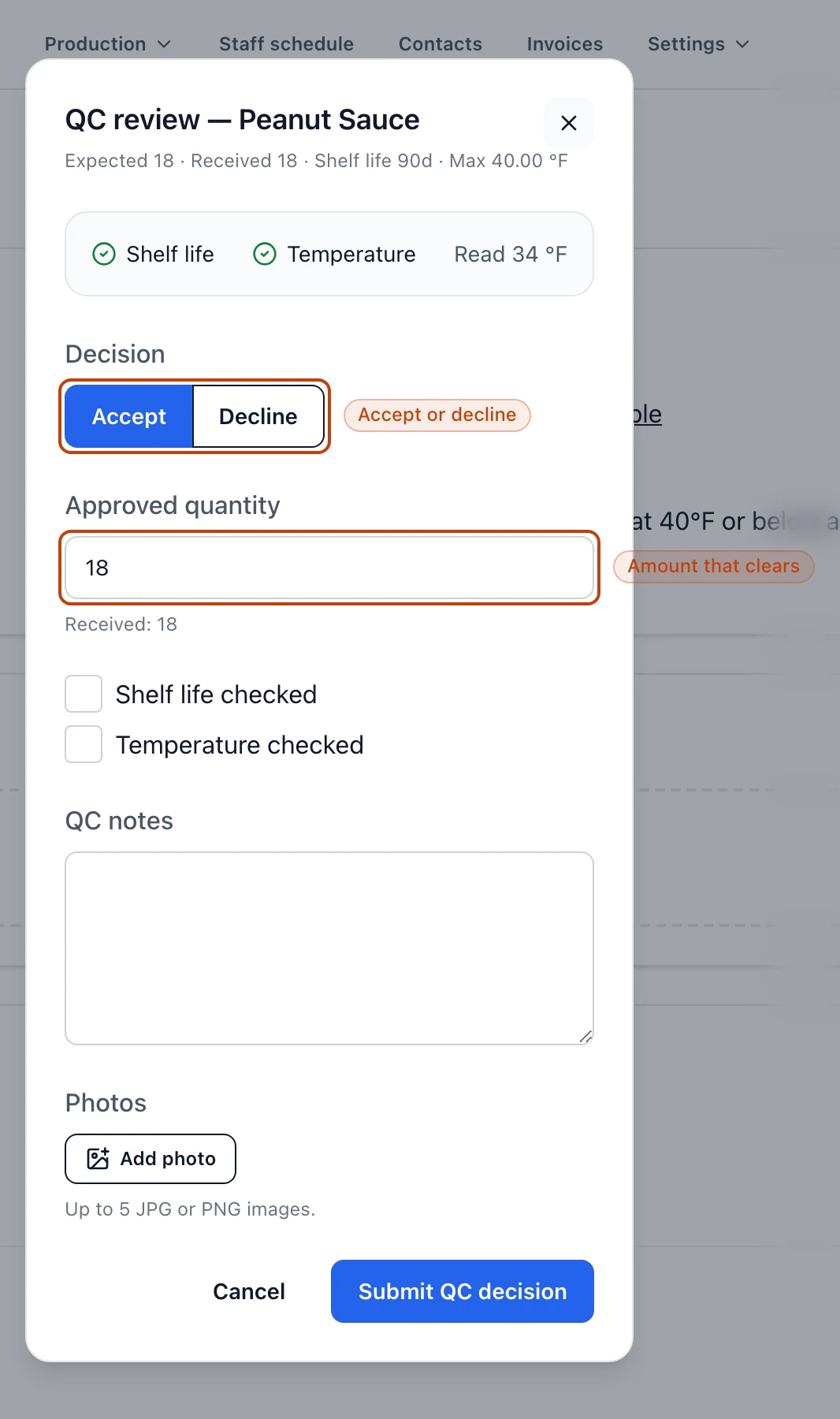
The review opens on a and lays out what it already knows. Across the top you get the
numbers to weigh the delivery against: what you Expected, what was Received,
the product's Shelf life in days, and its temperature limit as Max.
Below that is the reading the receiver took when they booked the line in — a
Shelf life and a Temperature flag showing whether each check passed, the
temperature that was read, and any notes or photos they attached. You're not
re-entering that; you're confirming it and adding your own decision.
The QC review: the Accept or Decline decision, the approved quantity that flows to putaway, and the shelf-life and temperature checks.
Approved quantity and received quantity
When you accept, the Approved quantity starts at the amount that was received,
and that's the number that carries forward to putaway. Drop it if some of what
arrived shouldn't go to stock — a few cases came in crushed, say — and only the
approved amount becomes on-hand. You can't approve more than was received; the
field won't take a number above it.
Declining needs a reason
Switch the decision to Decline and the Reason for declining field is
required — Bettr won't submit the review without it. A declined receipt reads
Declined and stops there: it isn't put away, so write the reason plainly for
whoever handles what happens to the stock next.
When a receipt lands in QC
Not every delivery is held. When a line is booked in, Bettr routes it to Awaiting
QC only when there's a reason to look:
the product is flagged QC required, so every delivery of it gets a review;
the receiver ticked Request QC review on the receive form to send it on
purpose;
the shelf-life check failed — the manufacture and expiration dates entered leave
the lot short of the product's full shelf life; or
the temperature reading came in above the product's limit.
Anything else clears on its own the moment it's received and skips this step
entirely.
What happens after you decide
Accepting a receipt moves the line to QC approved, and its button changes to
Assign location — the delivery is ready to
. Declining moves the line
to Declined, where it holds until someone decides what to do with the goods.
A cold reading routes, it doesn't condemn
A temperature above the limit is what sent many of these receipts to QC in the
first place — it doesn't mean the stock is bad. The review is where a person
looks at the reading, the product, and the load, and makes the call the form
couldn't.