Get into your workspace with a one-time link sent to your email — then add your name the first time so your team knows who's who.
On this page
Was this helpful?
Real help from real food people
Chef Diego runs a real food plant. If this page didn't get you there, tell us — a person reads every message.
Bettr Manager has no passwords. You sign in with a one-time link sent to your
email: enter your address, open the link, and you're in. The first time you do
this, it also creates your account and asks you to add your name, so your
teammates know who's who. Start from the sign-in page.
Sign in
1
Enter your email
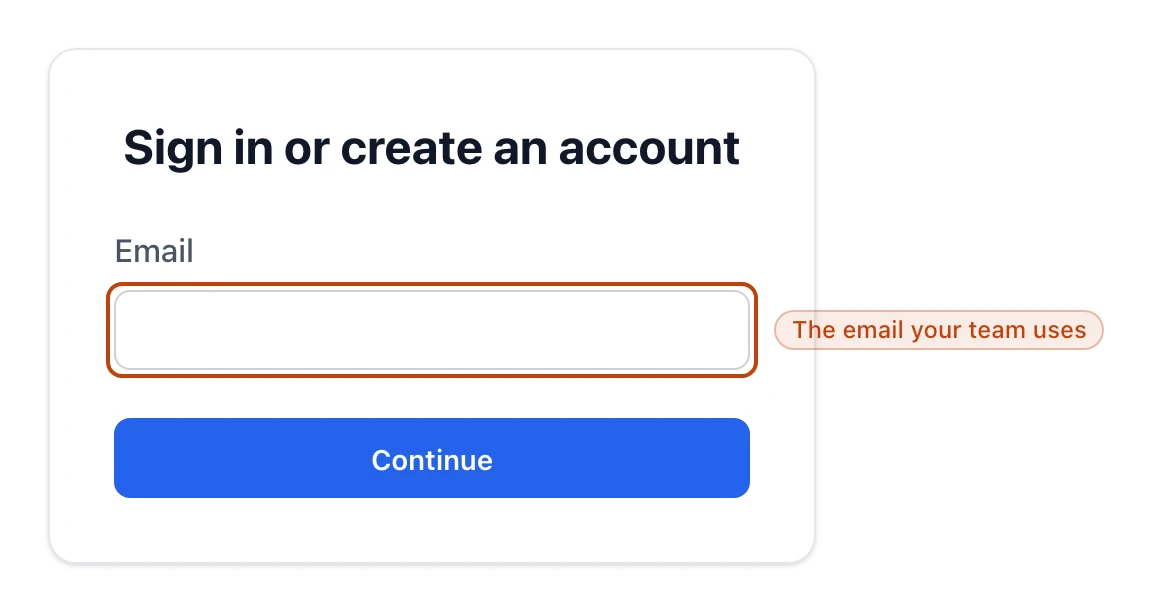
On the sign-in page, type the email your team uses for Bettr
Manager and select Continue. There's no password field — the same page signs
you in and creates a first-time account, under the heading Sign in or
create an account.
One field and one button: enter your email and select Continue.
2
Open the link we email you
Bettr Manager sends a one-time link to that address — look for the subject
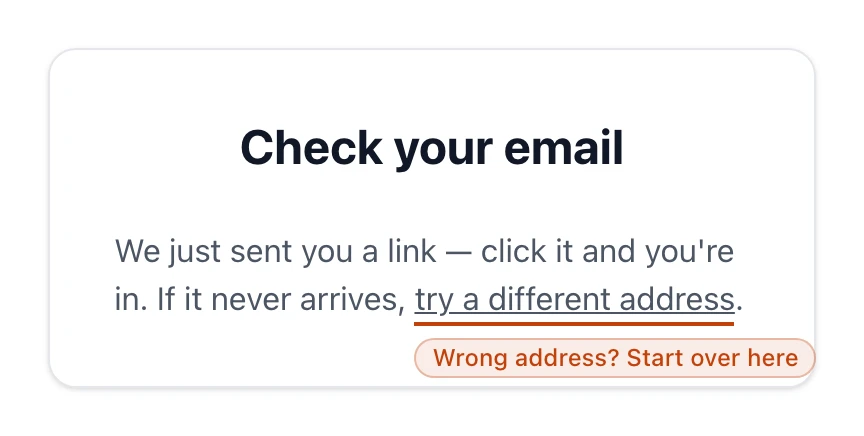
Your Bettr Manager link. While you wait, the screen reads Check your
email. Open your inbox and select the link; it signs you straight in.
The screen you see after requesting a link. If it never arrives, the link here takes you back to try a different address.
3
Add your name the first time
The first time you sign in, Bettr Manager asks for your First name and
Last name so your name shows up on runs, orders, and approvals. Enter
them and select Continue. Returning members skip this step.
4
Land on your home dashboard
Once your name is set, Bettr Manager drops you on your home dashboard, signed
in and ready. If you belong to more than one company, choose which one you're
working in from the top bar.
The "Check your email" screen
After you enter your email, Bettr Manager holds on the Check your email
screen while the link makes its way to your inbox. That's the confirmation your
request went through — nothing else to do here but open the email.
If the link never lands, the screen has a try a different address link that
takes you back to the email field. A typo in the address is the usual reason, so
re-entering it and requesting a fresh link fixes most cases.
Each link works once
A sign-in link signs you in a single time and then expires. When you need to
sign in again later, request a new one from the sign-in page — there's no
password to reset and nothing to recover.
Add your name the first time
Bettr Manager shows the Complete your profile screen only until your name is
set — on your very first sign-in, and never again after. Both First name and
Last name are required, and together they become your display name: the name
your teammates see next to production runs, purchase orders, and every approval
you sign off. Once you save it, Bettr Manager sends you on to wherever you were
headed.
Where you land
A member with a workspace lands on the home dashboard — the screen that greets
you each day and points to your open work. If you belong to more than one
company, you choose which one you're working in from the top bar.
If you've created an account but don't have a workspace yet, signing in takes you
to the pricing page instead, to pick a plan and set one up. Start your
subscription walks through that,
and Choose your plan compares the plans
first.