Enter a lot that's already in the building — pick the product, date the batch, and place its cases in one or more locations.
On this page
Was this helpful?
Real help from real food people
Chef Diego runs a real food plant. If this page didn't get you there, tell us — a person reads every message.
Most lots arrive on their own paperwork — booked in when you receive a purchase
order or when the kitchen sends
product back. But some stock is simply in the building with no document behind
it: the freezer and racks you already hold the day you start with Bettr, or a
batch that reached the dock outside any order. Manual entry writes that stock
onto the record, lot by lot, so counts, picks, and traces can find it. Open
Stock items
under Inventory and select New to follow along. Entering a whole
building's worth? Load your opening
inventory covers the grid built
for that sitting.
Enter a lot
1
Open the form
On the stock items list, select New — the last button at the top of
the page. The New stock item page opens on a single card
that describes one .
2
Pick the product
Under Product, type a name or product code and select the match. The
search covers every product in the company's catalog — if the batch in front
of you isn't in it yet, add the product
first.
3
Count and date the batch
Quantity takes the whole cases you're entering. Manufacture date and
Expiration date describe the batch itself — the expiration date is what
sorts the lot into the stock list's order, so date it from the case, not from today.
4
Number the lot — or let Bettr do it
Lot number can stay empty: leave it blank and Bettr assigns one when the
lot is created. When the batch already carries a code, type it here, put the
supplier's own stamp in Vendor lot number, and use Alternative lot
number for a second code the floor knows the batch by. A number another
live lot already uses is rejected, so the same code never points at two
batches.
5
Note where the stock came from
Reference number and Notes are free text and land on the lot's
inbound movement — a reference like Opening inventory lets you gather
every hand-entered lot in the movements feed later. Both can stay empty.
6
Place the cases
Under Locations, pick the spot the stock sits in and the cases stored
there. Once the product is picked, a location that can't hold its storage
type — a dry rack offered a frozen batch — reads Incompatible storage
and can't be selected. One row is the common case; select Add location
when a single batch is split across spots — a cooler and a rack, say — and
give each row its own quantity.
7
Create it
The bar at the foot of the page reads To store against Allocated,
and Create switches on only when the two match and nothing else is
missing. Select Create — Bettr returns you to the stock items list with
Stock item stored, naming the lot number it saved (or generated).
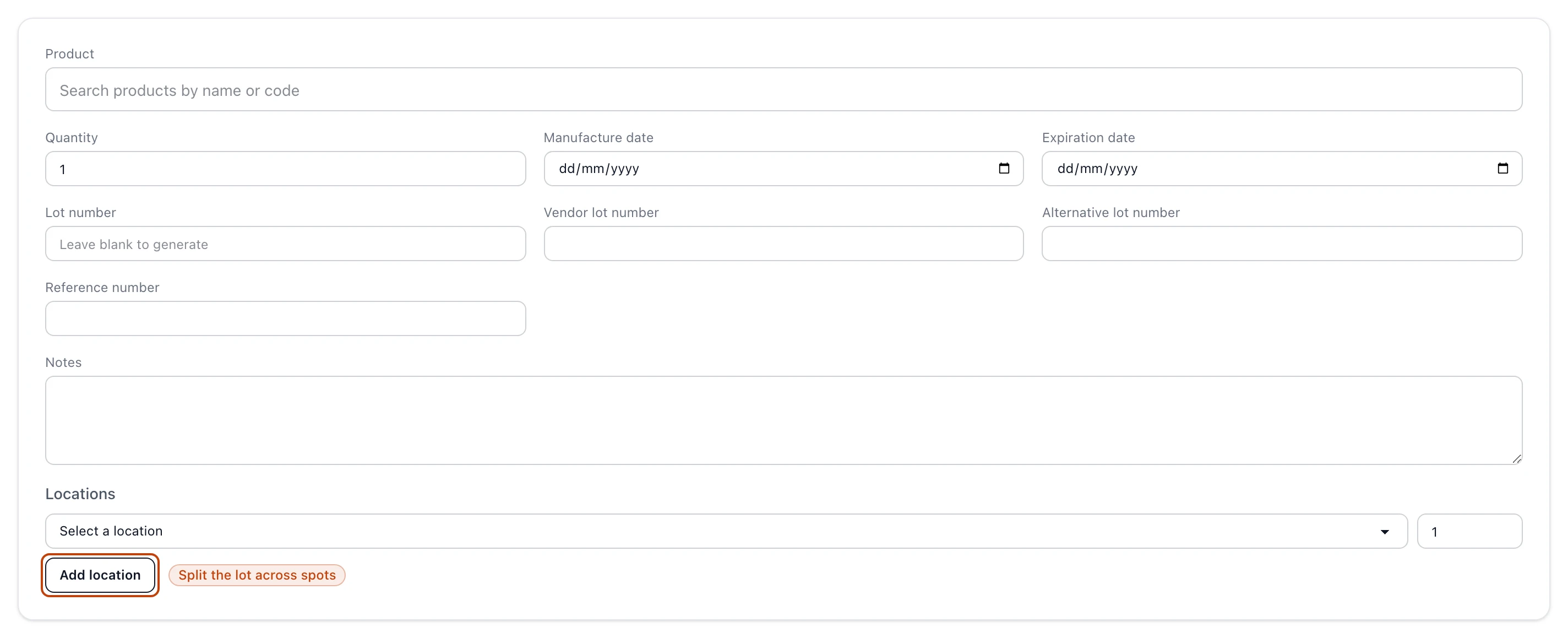
The New stock item card: the product search, the quantity and dates that describe the batch, the lot numbers, and the Locations rows that place its cases.
The balance at the foot of the page
Every case you're entering has to land somewhere, so the footer keeps a running
balance: To store is the lot's quantity, Allocated is what the location
rows add up to. Until they agree, Create stays off and the footer says
exactly what's missing — a product not yet picked, dates not yet set, or how
many cases are still unallocated. When everything lines up it reads
Complete, and the entry is one click from the record.
The footer before anything is filled in: the To store and Allocated balance, the reason Create is still off, and the Create button waiting on it.
On a brand-new company
A stock item needs a product to name it and a location to sit in. Open the page
before the company has either and the form doesn't render half-usable — a panel
says which is missing and links straight to New product or New location.
Add a product and set up your warehouse
locations, then come back.
What the entry writes
Creating the lot appends an inbound movement with the Manual Entry source —
the same append-only record a receipt or a kitchen return writes, so a
hand-entered lot traces exactly like any other. You'll find it on the
stock movements feed under the
Manual Entry source filter, carrying the reference and notes you gave it.
From that moment the lot's quantity is derived from its movements — picks,
counts, and waste draw it down like any other lot, and nothing is ever typed
over. How inventory works in Bettr
explains the model.
The inbound movements feed filtered to Manual Entry: each hand-entered lot with its reference, who entered it and when, the cases added, and the Manual Entry source tag.
Entering stock by hand is governed by the Create stock items permission,
under Warehouse & Inventory in the permission catalog — without it the
New button doesn't render and the page redirects to an unauthorized notice.