Record the cooking and cooling temperatures your recipes flag as critical control points, batch by batch, so every reading is on the record before an auditor asks for it.
On this page
Was this helpful?
Real help from real food people
Chef Diego runs a real food plant. If this page didn't get you there, tell us — a person reads every message.
The kettle timer goes off, your operator drops a probe into the Chicken Teriyaki
Bowl base, and it reads 170°F. That number is not a note on a clipboard — it is a
,
and it has to land in the record for that batch, with the time it was taken and
who took it. Bettr keeps the cooking and cooling logs on the run itself, next to
the batch they describe. Open
Production runs and
pick the run you're working.
Kitchen+
Where the logs live
A recipe carries a cooking or cooling CCP when it's set up with one — a minimum
cook temperature under an FDA or USDA authority, a cooling curve, or both. On a
run that includes such a recipe, the readings live in two places:
The line item — a
— holds the editable Cooking Log (CCP-1B) and
Cooling Log (CCP-2B) cards, where you type each batch's readings.
The run's Cooking Log and Cooling Log tabs roll every recipe's batches
into one table and carry the export buttons.
Those tabs appear only when a recipe on the run carries that CCP. A run of recipes
with no cooking or cooling limit shows neither.
Record cooking temperatures
1
Open the recipe's line item
From the run's Recipes tab, select Continue on the recipe that's in
progress, or Start on one still pending. Scroll to the Cooking Log
(CCP-1B) card — its header shows the recipe's minimum, like Min
temperature 165°F.
2
Enter the three readings
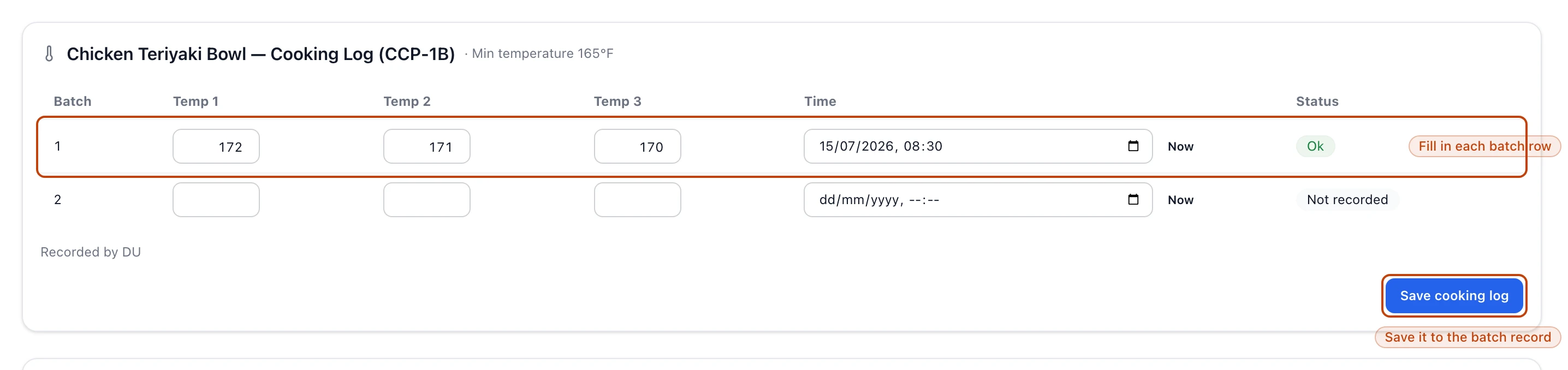
In the batch's row, type Temp 1, Temp 2, and Temp 3 — three probe
reads on the same batch. If any one of them falls below the minimum, the row's
Status turns Red Alert.
3
Stamp the time
Type the Time, or select Now to fill it with the current time.
4
Save the log
Select Save cooking log. The reading lands on the
, and the card notes
who entered it under Recorded by.
The Cooking Log (CCP-1B) card on a line item: batch 1's three readings and time are in and the row reads Ok, while batch 2 is still Not recorded. Save cooking log writes it to the batch record.
Let Bettr stamp the times
The Now button on cooking, and Defaults on cooling, fill the time fields
for you — so the floor logs a real reading instead of stopping to type a
timestamp mid-cook.
Record cooling temperatures
The Cooling Log (CCP-2B) card works the same way, one row per batch, but it
tracks a curve instead of a single reading: the product has to fall below 80°F
within 2 hours and below 40°F within 5 hours.
1
Record the start
Enter Start °F and Start time when cooling begins. Defaults stamps
the start at the current time and pre-fills the 2-hour and 5-hour times, so you
only come back to fill the temperatures.
2
Record the two checks
Fill 2h °F and 2h time, then 5h °F and 5h time, as you take each
reading. A 2-hour reading over 80°F, or a 5-hour reading over 40°F, flags
Red Alert.
3
Save the log
Select Save cooling log.
Read pass or fail on a batch
Each row carries a Status you can read at a glance:
Not recorded — nothing entered for the batch yet.
Ok — every reading is within the limit.
Red Alert — a reading breached the limit.
A Red Alert is a food-safety event, not a typo
The breach stays on the record. Re-enter the row only to fix a genuine mis-key;
a real under-temperature reading is a call for your food-safety plan, and hiding
it defeats the whole point of the log.
The run's Cooking Log and Cooling Log tabs consolidate every recipe on the
run into one table — Batch, Temperatures, Times, Status — so a
supervisor reads the whole day's CCPs in one place. Here the Status tracks how
complete each batch's log is: Missing, Incomplete, Partial,
Complete, and — on the Cooking Log — Alert when a recorded reading came in
under the minimum. When a run mixes recipes under different authorities, the table
groups them under an FDA or USDA heading so each set reads against its own
rule.
The Cooking Log tab consolidates a run's batches: batch 1 shows its three readings and time and reads Complete, batch 2 is still Missing. The export buttons sit above the table.
Export the log
Above the consolidation table, each log has a button per template — the FDA and
USDA formats (FDA PDF and USDA Kettle PDF for cooking, FDA PDF and
USDA IQF PDF for cooling). Selecting one opens a print-ready log in a new tab:
your plant details, the batches' readings and initials, the critical limit
spelled out, and blank rows for anything logged by hand. USDA templates add a
verification block. The note at the top reads "use your browser's print dialog to
save as PDF" — select Print this log to do exactly that. This is the batch
record an auditor asks for.