The path an order takes from a customer's request to stock leaving your dock — the stages it passes through, the two ways stock ships, and how what leaves stays traceable.
On this page
Was this helpful?
Real help from real food people
Chef Diego runs a real food plant. If this page didn't get you there, tell us — a person reads every message.
A buyer at a grocery chain calls in an order for ten cases of chicken thighs. Three days later a refrigerated truck pulls away from your dock with those cases on it, each tied to the exact lot it came from. Between that call and that truck, the order moves through a handful of stages, and the stock leaves your building in one of two ways.
Every order you take lives on the Sales orders screen. A is the spine of everything that follows: it holds what was promised, tracks how much has actually shipped, and becomes the invoice you send. Sales lives behind the Sales module, so you will see it once your plan turns that module on.
The life of a sales order
An order carries a status, and the status is its stage in the flow. You read it as a badge on the list and on the order itself.
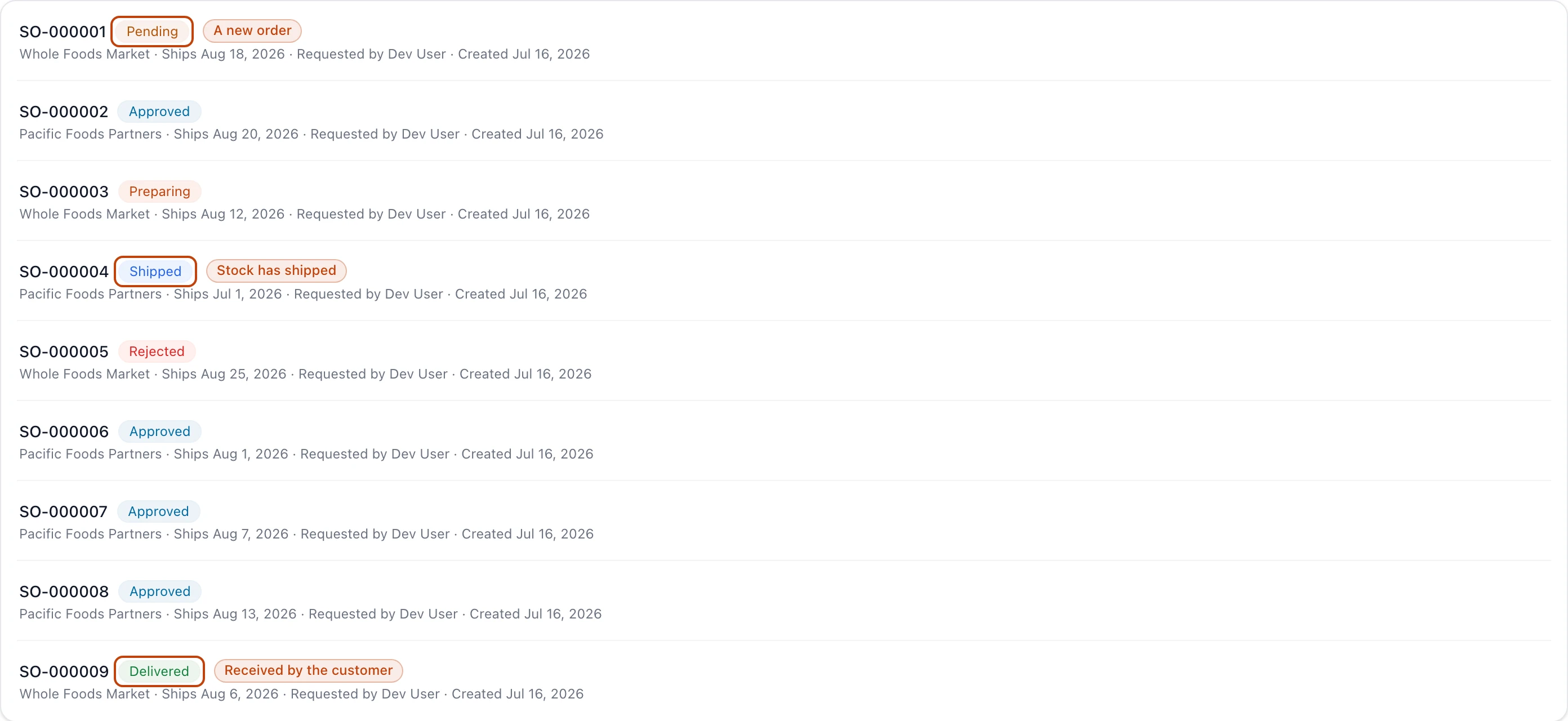
The Sales orders list. Each order wears its stage as a status badge, from a fresh Pending order down to one that has been Delivered.
Pending — a new order, still open to edits. You can change the customer, the lines, and the prices while it sits here.
Approved — someone with the authority committed to the order. It locks: the lines no longer change, and the order is ready to be prepared.
Rejected — the order was declined instead of approved. This is final, and it carries a note explaining why. An order still in Pending can also be discarded, which drops it from your lists for good.
Preparing — the order is being staged for shipment, one line at a time, from stock on hand.
Shipped — the stock has left the building. Bettr recorded which lots went out and moved them off your on-hand count.
Delivered — the customer confirmed they received the order. If only part of it arrived, the order reads Partially delivered until the rest is confirmed.
Each stage allows the next: you cannot prepare an order that is not approved, and you cannot ship one you have not prepared. That sequence is what stops a half-finished order from going out the door by accident.
Two ways stock leaves the building
Stock ships out of Bettr through two separate doors. Most sales go through the first.
Fulfilling a sales order
This is the front door for selling to a customer. You take the order, approve it, prepare the shipment against stock on hand, and ship it. The order you approved is the same order you ship and later invoice, so the promise and the proof stay on one record.
Finishing a picking
A is a warehouse job, not a sale. It names the lots to pull and where they are headed — often a department that will consume them. When the crew finishes the picking, the lots they pulled are drawn out of stock and recorded as a shipped delivery of their own. That delivery becomes a sales order too, sometimes one with no customer attached, so the stock that left is still on the books.
Picking does not feed a sales order's shipment
The two paths do not cross. A sales order's shipment is built from stock on hand, not from a picking. A picking is its own operation that ends in its own shipped delivery. You reach it from Picking under Inventory.
Building the shipment, line by line
When you prepare a sales order, every line needs stock staged against it before the order can ship. You pick a lot and a location for each line and stage the quantity that covers it. A line reads Needs stock until you stage anything, Partially covered while it is short, and Covered once its full quantity is staged.
When you go to stage a lot, Bettr offers the on-hand lots of that product ordered by . The soonest-to-expire lot sits at the top of the list. That is how the right stock leaves in the right order without anyone reading date codes off boxes.
You can ship once every line is covered. Shipping is final: it records a stock movement out of each staged location and drops those cases off your on-hand count. If a line is still short, shipping under-ships it — Bettr warns you and ships only what you staged.
What ships is what you can trace
Shipping does not just subtract a number from inventory. Each shipped line keeps the exact lot and location that went out, tied to this order.
That record is the backward and forward trace. From a lot, you can find every order it shipped on and every customer who received it. From an order, you can find the lots that filled it and the supplier they came from. It is the same lot genealogy your inventory carries, followed out the door.
Alongside the shipment, you can record the truck that carried it — the carrier, the driver, the trailer's condition, and its set-point and actual temperature. For a cold-chain product, that record is what shows an auditor the chicken stayed frozen from your dock to the customer's.
From shipped to invoiced
A shipped order is ready to bill. If your company runs on Odoo, shipping handed the delivery across and the invoice was raised there against the same customer and lines — so you are not re-keying what you already shipped. Generate an invoice from a sales order shows how to pull it back as a PDF, straight from the order; Bettr keeps no editable copy, so corrections happen in Odoo and the download always fetches the current posted version. To build an invoice by hand instead, create an invoice in Invoices.
Related
How inventory works — the lots and locations that a shipment draws from, and the trace it leaves behind.
How billing works — the customer invoice a shipped order turns into, and how it stays separate from your subscription.