Weigh or count what a batch produced, read each entry, move the batch forward, and print a label for what came out.
On this page
Was this helpful?
Real help from real food people
Chef Diego runs a real food plant. If this page didn't get you there, tell us — a person reads every message.
Batch 1 of the teriyaki bowls is cooked, cooled, and packed into cases. The
inputs are already weighed and the recipe is running — now you tell Bettr what
this batch actually made, so the next one can start and the finished bowls carry
a lot you can trace. Recording output is the other half of a batch: weigh what
came off the line, or count the cases and loose units, and every entry lands
against the batch you're on. Open
Production runs, pick
the run, and open the recipe you're recording.
Kitchen+
Find the batch you're recording
Output is recorded on the same screen as weighing — a
. From the run's Recipes tab, select Continue
on the recipe that's In progress, or Start on one still Pending. The
line item opens on the batch you're working.
Scroll to the Output card. It shows the batch's
at a glance:
Target 50.000 un — what this batch should produce.
Produced 124.000 un in total — everything recorded so far, across every
batch on this recipe.
Weigh output and Count output — the two ways to record an entry.
The Output card on a line item: this batch's target, the total produced across the recipe, and the two ways to record — Weigh output for a scale reading, Count output for cases and loose units.
Weigh the output
Use Weigh output when you read the finished amount off a scale.
1
Open the output sheet
Select Weigh output. The sheet opens against the batch you're on.
2
Enter what the scale reads
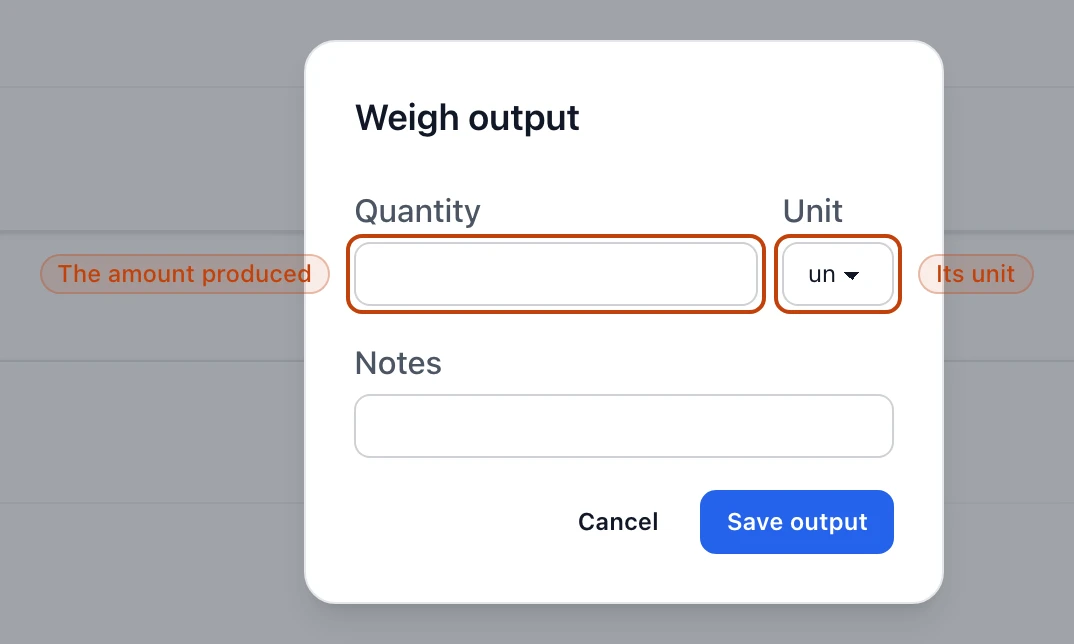
Type the amount into Quantity and pick its Unit — a weight unit when the
recipe yields in pounds, or units when it yields by the piece. Add a Notes
line if the entry needs a comment.
3
Save the entry
Select Save output. The entry drops into the Output entries list below,
and the amount is moved into the batch's
.
The Weigh output sheet: enter the quantity the scale reads and the unit it's in, then Save output to record the entry against this batch.
Count by case and loose units
When the recipe carries a
, Count output lets you record by the case
instead of by weight. Enter how many of each group you filled and how many
Loose units are left over. Bettr multiplies each group by its units-per-group,
adds the loose units, and records the total — count 8 cases of 12 plus 4 loose,
and the entry reads 100 un. A counted entry is tagged counted in the list.
You have to count at least one unit; an empty count is refused.
Check the entries you recorded
Every saved entry shows in the Output entries list, newest first — its
quantity and unit, the batch it belongs to, and a counted tag when it came
from a count. Each row carries a Label link and an Undo action.
Undo reverses an entry, taking its amount back out of the WIP lot, so a
mistyped weight or a double-counted case doesn't stick.
Undo only works while the batch is live
Once you Finish recipe, the floor screen won't reverse an entry — reopen the
recipe first. And if the output has already been drawn from its WIP lot further
down the line, Bettr refuses the undo rather than pull stock that's already moved.
Target, produced, and remaining
The Output card compares this batch's Target against the recipe's total
Produced. When the current batch reaches its target, the card adds a
batch complete note. In the supervisor view, the Batch overview breaks the
same numbers down per batch — each row reads Output 100.000 / 100.000 un with
an Output complete badge, or Ingredients pending while a batch still owes
weighings.
Record more than the run was scheduled for and Bettr doesn't block it: a banner
notes how much you produced against the schedule, and the excess is kept in the
WIP ledger rather than lost.
Move each batch forward
A weigh-per-batch recipe runs one batch at a time. Once you've weighed every
ingredient and recorded the output for the batch you're on, Finish batch 1
advances you to the next one and resets the targets to its share. If the recipe is
set to require output before the next batch, Bettr holds you there until this
batch's output is recorded. The final batch has no button to advance — there's
nowhere left to go. A weigh-per-run recipe skips all of this: it records a single
output against the whole run, with no batches to advance.
Confirm a run of batches at once
In the supervisor Batch overview, Confirm batches weighs every ingredient
and records the output for a run of consecutive batches in one step, advancing
between them — handy when several identical batches are done and you're catching
the paperwork up after the fact.
Print a label for an entry
Label on an output entry opens that entry's WIP lot sticker — a QR label the
floor can scan later — in a new tab. Print batch label, on the batch card and
each Batch overview row, prints the label for the whole batch. Both open ready to
send to the printer. Printing a run's labels together and exporting the batch
records an auditor asks for is its own task; see
Print labels and export batch records.