The states a supplier return moves through, the fields on each return and its items, what validating does to your stock, and the permissions that gate the work.
On this page
Was this helpful?
Real help from real food people
Chef Diego runs a real food plant. If this page didn't get you there, tell us — a person reads every message.
A month after you sent two split cases of rice back, the vendor asks which lots
went and whether they've shipped. The answer is on the receipt they arrived on. A
keeps the lots, the
quantities, the reason, and where it stands, and you raise and read them from the
same receipt in
Receiving where the
delivery was booked in. This page names every state a return moves through, the
fields it carries, and what happens to your stock when you put it through.
Kitchen+
Where returns live
Returns are built one receipt at a time — one delivery against one order line. Open
the order in Receiving, and a received line carries a Returns button beside
Details and Lot labels; it appears once you hold the View supplier
returns permission. That button opens the returns panel for the receipt: every
return raised against it, newest first, each with its status, its reason, its
quantity, and the actions its state allows.
Return states
A return's status is derived from what has happened to it, never typed in. Each one
tells you where the return stands and what your stock has done:
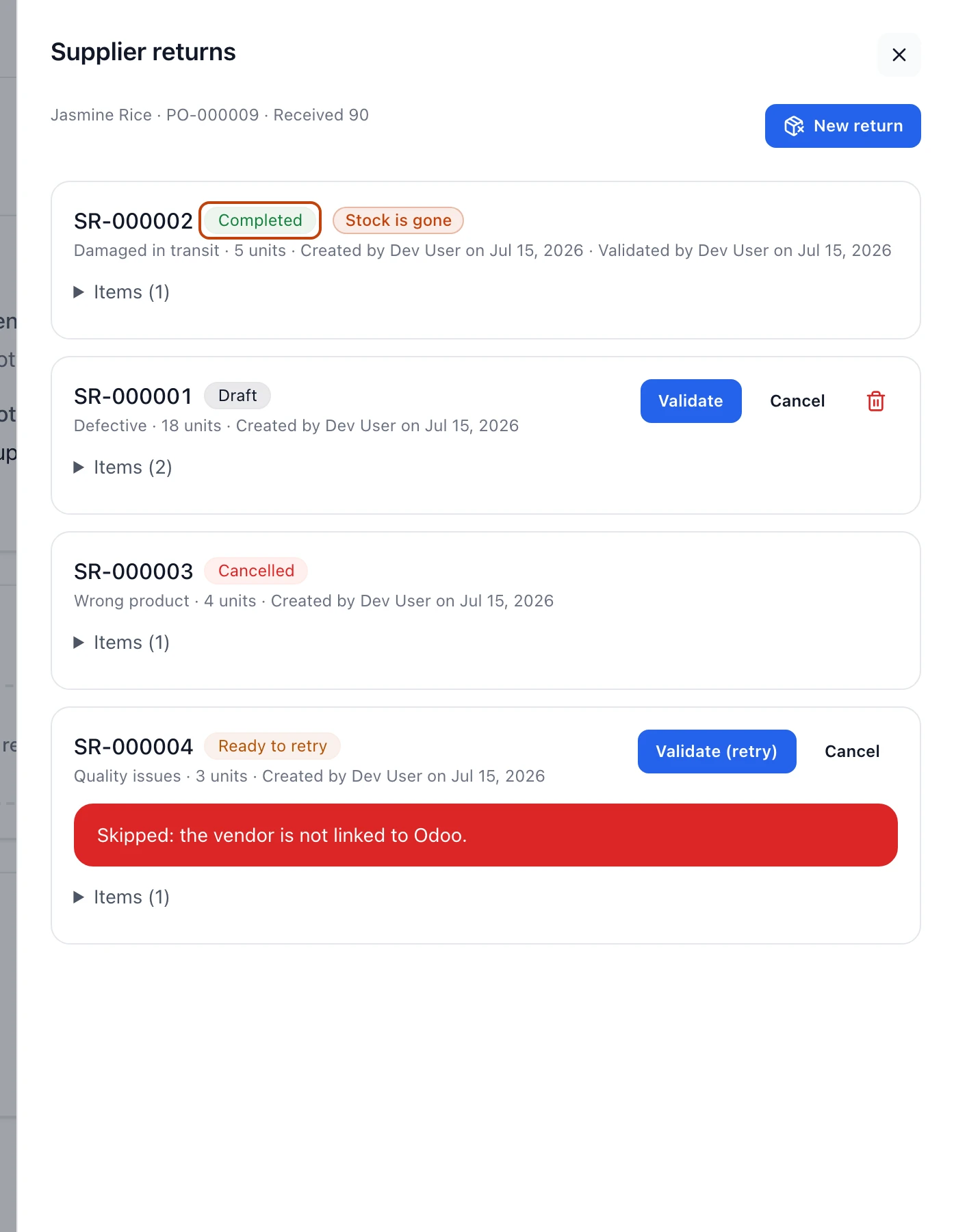
One receipt's returns, one card per state. The badge is the whole story: a Completed return has left your shelves, while Draft, Cancelled, and Ready to retry have not moved a unit.
Draft — raised and recorded, with nothing pulled from your shelves yet. It
carries Validate, Cancel, and a delete action.
Completed — validated. The stock is off your shelves and the outgoing transfer
to the vendor is recorded. It shows who validated it and when, and it is final —
no actions remain.
Cancelled — called off before it was validated. No stock moved, and it can't
be reopened. Final.
Ready to retry — validation was attempted and didn't finish. The card names
what it ran into, your stock is untouched, and it carries Validate (retry) and
Cancel.
Cancel and delete leave different trails
Both drop a return you haven't validated, but not the same way. Cancel works
on a draft or a ready-to-retry return and leaves a Cancelled record on the
receipt. Delete works only on a draft and removes it from the receipt
entirely, as if it was never raised.
Fields on a return
Every return carries a header that reads the same across states:
Number — a company-sequential identifier in the form SR-000001, assigned
when the return is created.
Reason — why the stock is going back, one of Defective, Damaged in
transit, Wrong product, Quality issues, Expired or near expiration,
or Other.
Quantity — the total units on the return, summed across its items.
Created by and Created on — who raised the return and the date.
Validated by and Validated on — added when a return reaches Completed,
naming who put it through and when.
What it's waiting on — a note naming what the last validation attempt ran
into. A setup gap reads as an amber note that names the gap and the step that
closes it, such as the vendor on this receipt is not linked to a contact in
Odoo. A transfer your ERP turned down reads as a red note saying so and telling
you to send it again — the exact wording your ERP replied with isn't on the card,
and support can read it back to you if the retry keeps failing. A transfer that
went through in your ERP while the return itself did not finish reads as a red
note naming the stranded transfer and telling you to cancel it there — that one
shows up even on a Completed or Cancelled return, because the transfer is
still sitting in your ERP either way.
Notes — an optional line the person raising it can add for context.
Fields on each item
A return holds one or more items, each a lot you're sending back. Expand Items
on a return to read them:
Lot — the lot number of the stock, with its alternative lot number beside it
when the product carries one.
Product — the product name and its code.
Expiration — the lot's expiration date, when it has one.
Quantity — the units of that lot on the return.
Locations — how the item's quantity is split across the bins that held the
lot, each with its location code and the units drawn from it.
What validating does to your stock
Validating is the only step that touches inventory. Confirming Validate on a
draft or ready-to-retry return pulls each item's allocated quantity out of its bins
and records an outgoing transfer of that stock to the vendor in your connected ERP.
A return can't send back more than the receipt took in, and no item can send back
more than its lot has on hand at the moment you validate.
A completed return can't be undone
Once a return is Completed, the stock is gone from inventory and the vendor
transfer is recorded. There's no reopening it — validate only when the lots and the
counts are the ones you mean to send back.
Every other state leaves your stock exactly where it is. A draft and a cancelled
return never move a unit. A Ready to retry return means validation ran and
didn't finish, so nothing left your shelves. Usually the ERP transfer was never
sent — the vendor or a product isn't linked to your ERP, or the ERP was
unreachable. Now and then the transfer does go through and the return still
doesn't finish, because the lots were used elsewhere in the seconds it took or
someone put the same return through at the same moment; the card says so and tells
you to cancel that transfer in your ERP. Fix what the card names, then Validate
(retry) to send it through.
Who can work with returns
Each step is its own permission, set per role under Warehouse & Inventory in the
permission catalog:
View supplier returns — see the returns panel on a receipt and open its
returns. This is what puts the Returns button on a received line.
Create supplier returns — raise a new draft return against a receipt.
Validate supplier returns — put a return through, pulling the stock and
recording the vendor transfer.
Cancel supplier returns — call off a draft or ready-to-retry return.
Delete supplier returns — remove a draft return from the receipt.